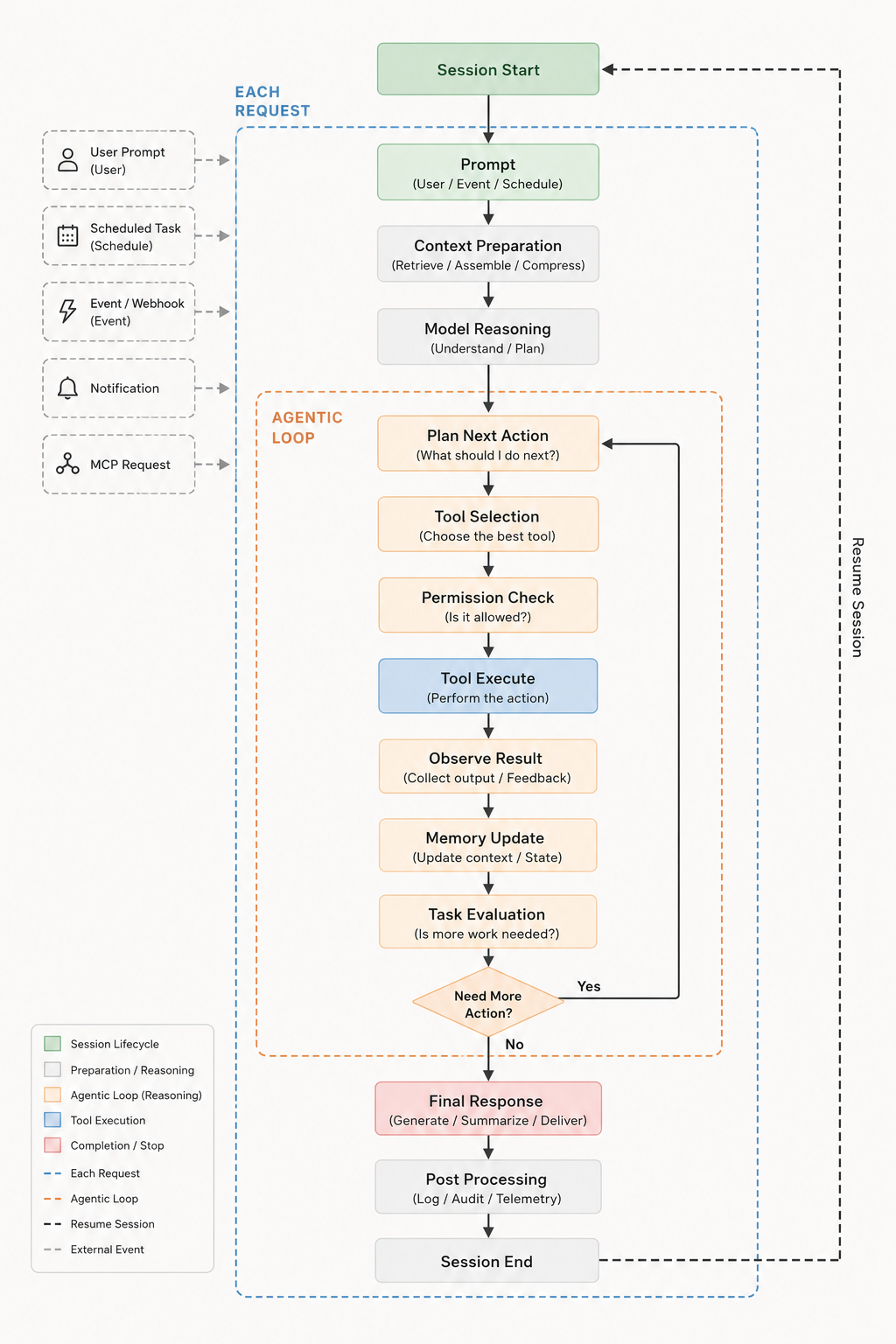
Triggers
A turn starts from a user prompt, a scheduled task, an event or webhook, a notification, or an MCP request. Whatever the source, it enters the same pipeline — nothing gets a private code path.
Each request
- Prompt — the incoming request, normalized regardless of which trigger produced it.
- Context preparation — retrieve, assemble, and compress history, files, and tool schemas to fit the context window.
- Model reasoning — the model understands the task and plans an approach before touching anything.
Agentic loop
- Plan next action — decide the single next step.
- Tool selection — choose the best tool for that step.
- Permission check — the human-in-the-loop gate; a rejected call never runs.
- Tool execute — perform the action.
- Observe result — collect output and feedback, including failures.
- Memory update — fold the result back into context and session state.
- Task evaluation — is more work needed? If yes, loop back to planning; if no, exit the loop.
Completion
- Final response — generate, summarize, and deliver the answer.
- Post processing — logs, audit trail, and telemetry.
- Session end — state is persisted, so a later trigger can resume the same session.
Each step streams as an event, which is what the TUI renders live and what an embedding application can subscribe to. See how it's built →